MT4 - MT5 Indicators & EAs - Phylo

  • Thread starter Thread starter Phylo
  • Start date Start date
  • Watchers Watchers 3
MT4 - Indicator : # - DAY_DATE_OF_WEEK_1A

Note: If the Indicator is renamed it will not function and alert. The only solution to re-function the indicator is to return the indicator to it's original name.
Settings: can be saved and loaded via Save & Load buttons.
  • Position: at Time (hh:mm)
  • Days look-back: 1-xxx, 0 = all days
  • Drop-List: Date - Date - Month - Year
    • Day
    • Day - Date
    • Day - Date - Month
    • Day - Date - Month - Year
  • Drop-List: Text Axis
    • Chart Bottom
    • Chart Top
  • Drop-List: Text Angle
    • Horizontal
    • Vertical
  • Font Size
  • Shift: Up - Down
  • Colors
Screenshot from 2025-07-19 00-48-51.png

Screenshot from 2025-07-19 00-23-54.png

Screenshot from 2025-07-19 00-29-15.png
 

Attachments

Last edited:
MT5 - Indicator : # - DAY_DATE_OF_WEEK_1A

Note: If the Indicator is renamed it will not function and alert. The only solution to re-function the indicator is to return the indicator to it's original name.
Settings: can be saved and loaded via Save & Load buttons.
Screenshot from 2025-07-19 00-48-51.png

Screenshot from 2025-07-19 00-23-54.png

FEATURES - AS PREVIOUS POST 🖕
 

Attachments

Last edited:
MT5 : # - PRICE_CROSS_MA_ALERTS_1.0
Note: If the indicator is renamed it will not function and alert. The only solution to re-function the indicator is to return the indicator to it's original name.
Settings: can be saved and loaded via Save & Load buttons.

FEATURES: AS ABOVE


ALERTS selection:
  • Sound
  • PopUp
  • Mobile
  • PopUp & Mobile
ARROWS:
  • Show Arrows: True / False
  • Arrow colour and size controlled from the Colors tab
OPERATION selection:
  • Bar Close - (LONG CROSS / SHORT CROSS)
  • Touch & Bar Close - (TOUCH / LONG CROSS (T) / SHORT CROSS (T)
ALERTS TIME selection:
  • Server Time
  • Local Time
ALERT OPERATION:
The below chart is a test chart testing operation function Touch & Bar Close against, 5 - LWMA - 5 (shift).
Note:
  1. Server Time: Only available on the splash Alert.
  2. Local Time: Alarms in the the Alert List will default to the Local Server (PC) Time
ALERT ANALYSIS - right down arrow to left up arrow.
  • 1a - TOUCH 21:59:09
  • 1b - LONG CROSS (T) 22:00:34 (left to right - last and 2nd magenta down arrow)
  • 1c - Splash LONG CROSS (T) 00:00:34 (server time)
It should be clear that 1a & 1b are in the same M1 periods as SHORT CROSS (T) with close @ 22:00:34
The splash Alert duplicates SHORT CROSS (T) with close @ 22:00:34 but with Server Time 00:00:34
The light blue vertical light indicates a terminal server time of 23:59 and 1c - splash LONG CROSS (T) 00:00 [:34] (server time).
It should be clear that the 1 minute difference is due to the bar M1 period.
  • 2a - TOUCH 21:54:00
  • 2b - LONG CROSS (T) 21:56:00 (left to right - 2nd green up arrow)
TOUCH 21:54:00 is not registered as SHORT CROSS (T) due to SHORT CROSS (T) 21:50:00
LONG CROSS (T) 21:56:00 has gapped above the MA but has registered as LONG CROSS (T) 21:56:00 due the last MA cross SHORT CROSS (T) 21:50:00.
  • 3a - TOUCH 21:49:12
  • 3b - SHORT CROSS (T) 21:50:00 (2nd magenta down arrow)
It should be clear that 3a & 3b are in the same M1 periods as SHORT CROSS (T) with close @ 21:50:00
  • 4a - TOUCH 21:44:42
  • 4b - LONG CROSS (T) 21:45:00 (2nd magenta down arrow)
It should be clear that 4a & 4b are in the same M1 periods as LONG CROSS (T) with close @ 21:45:00

View attachment 342265

View attachment 342273
View attachment 342270
UPDATE:
MT4 & MT5: # - PRICE_CROSS_MA_ALERTS_1.A
Note: If the indicator is renamed it will not function and alert. The only solution to re-function the indicator is to return the indicator to it's original name.
Settings: can be saved and loaded via Save & Load buttons.

Screenshot from 2025-07-23 02-34-01.png

Screenshot from 2025-07-23 02-47-49.png
 

Attachments

Last edited:
//+------------------------------------------------------------------------------------+
//| Copyright 2015, MetaQuotes Software Corp.
//|
//| Indicator: iClock_Mod1
//| Author: mladen -
//| Modifier: File45 (Phylo)
//| * 2015/4/09: Convert from mql5 to mql4
//| * 2015/4/09: Add alerts: Sound only, PopUp, Mobile
//+------------------------------------------------------------------------------------+
#property description "Continuous second by second count down bar timer."

The below indicators are a complete recode with respect to the the above indicator

MT4 - Indicators
# - BAR_COUNT_DOWN_1A
# - BAR_COUNT_UP_1A


Note: If the Indicator is renamed it will not function and alert. The only solution to re-function the indicator is to return the indicator to it's original name.
Settings: can be saved and loaded via Save & Load buttons.

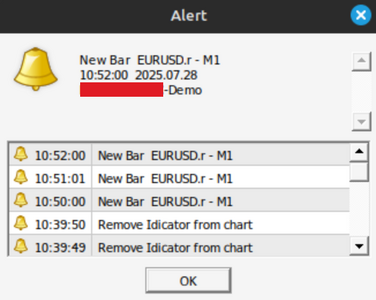
Activating Alerts
  1. Select alert option from Alerts input
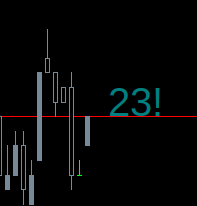
  2. Double click counter text on chart to load alert option ~ ^ ! ^! [ 0:23 >> 0:23^ ]
  • Counter Location
    • Chart Corner
    • Price >>
  • Alerts
    • Sound only ~
    • PopUp ^
    • Mobile !
    • PopUp & Mobile ^!
  • Alert Symbols
    • Sound Only: ~
    • PopUp: ^
    • Mobile: !
  • Counter Text Color: Teal
  • Counter Text No Tick Color: Red (indicates no tick on new bar with (-) sign. After the first new bar tick the counter will resume Text Color and alert if alerts loaded.
  • Font Size: 30
  • Font Name: Arial
  • Corner Mode: as selected
  • Corner Left - Right
  • Corner Up - Down
  • Price >> Left - Right
  • price >> Up - Down
# - BAR_COUNT_DOWN_1A / # - BAR_COUNT_UP_1A

Screenshot from 2025-07-28 10-53-06.png
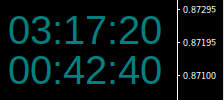
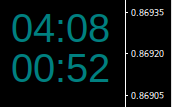
Counter Location: Chart Corner [ top: count down - bottom: count up ]
Screenshot from 2025-07-28 10-42-40.pngScreenshot from 2025-07-28 10-40-53.pngScreenshot from 2025-07-28 10-27-33.png
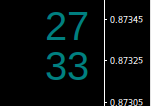
Counter Location: Price - Alert loaded: Mobile
Screenshot from 2025-07-28 10-25-39.png
 

Attachments

Last edited:
Metatrader oversized resolution problem when installing on Linux with Bottles
Image  2025-08-13  03-36-40.png

How to correct -
One:
  • close relevant Metatrader terminal
  • open Bottles
Image  2025-08-13  01-43-10.png

Two: select and open relevant Bottle - click Application
Image  2025-08-13  01-47-31.png

Three: expand Legacy Wine Tool
Image  2025-08-13  01-50-21.png

Four: click Configuration to open Wine Configuration Window which can be hidden behind the above window:
  • select Graphics tab
  • slide Screen resolution to lowest dpi
  • click [ OK ] button and close
Image  2025-08-13  01-55-02.png

Five: open relevant Metatrader terminal with corrected resolution - if resolution needs to be adjusted up repeat steps One to Five on a stepped incremental basis - caution - the Configuration Window when reopened expands in size according to resolution and too high a resolution can result in so large a Configuration window - with no resizing feature - that the [ OK ] button is not visible on the screen and therefore unreachable to activate a new resolution setting.
Image  2025-08-13  04-02-00.png
 
Last edited:
MT4 - MT 5 - Indicator : HORIZONTAL_LINES_V1

Heads Up: This indicator cannot be renamed - it will not show on the chart and alert until renamed back to the default name.
HL_1.png

HL_4.webp
 

Attachments

Last edited:
MT4 - MT5 Indicators : SPREAD_LINES_X

⏰⏰
This indicator cannot be renamed - it will not show on the chart and alert until renamed back to the default name.

Indicator Objectives
Primary : To draw a synthetic Ask line offset from the default Bid line.​
Secondary : Change the style of the synthetic Ask line, default Ask and Bid Lines​

Spread Options
Spread: Offset only​
Spread: Default only​
Spread: Offset & Default​

Why Use This Indicator ?
I use this indicator on a daily basis to visually monitor a static spread relative to price action with reference to a spread betting* account because I do not use the account charts.​
* in the UK spread betting accounts are tax free accounts​
Other than changing style of the Ask and Bid lines - a by product of the primary objective - if you have no clear idea why you would use it, then you do not need another indicator.​
SLX_0.png

📢
SLX_0a.png

Set to false if required and save via
SLX_0b.png


Spread: Offset only
Default Bid: 1.13458​
Spread Offset = 6 points​
Synthetic Ask = 1.13458 + 0.00006 = 1.13464​
SLX_1.png


Spread: Default only
Default Bid = 1.13470​
Default Spread = 2 points​
Default Ask = 1.13470 + 0.00002 = 1.13472​
SLX_2.png


Spead: Offset & Default
Default Bid = 1.13450​
Spread Offset = 6 points​
Synthetic Ask = 1.13450 + 0.00006 = 1.13456​
Default Bid = 1.3450​
Default Spread = 1 point​
Default Ask = 1.13450 + 0.00001 = 1.13451​
SLX_3.png
 

Attachments

📢 📢 📢

Recent MT5 updates are another notorious disaster with chart and indicators freezing and all sorts of other shit.

My day trading connections are via infinitely more stable and secure Ethernet cable and via Linux - not Wi-Fi which is prone to interference and other compromising insecurities and via Windows. Cannot comment of Windows - have long dumped MS.

Don't waste your time blaming and trying to fix indicators or looking for solution to fix MT5 via the usual click-bate BS - its the MT5 update that is broken. It is only an MT5 update that can fix it.

Having coded for many years these MT4 / MT5 indicators are a doodle to knock up - but I don't trade via MT5 and keep Sierra Charts as a back up for time frames not accommodated in MT4.

Note 1: I have no commercial connection with Sierra Chart and if MT5 did not have a habitual history of breaking there would be no need for any back up charting.

Note 2: The feature list is vast and can be an infuriating frustration to find how to set up - I find google the quickest.

Sierra Charts - about £20.22 / month
Screenshot from 2026-08-03 13-14-19.png
Screenshot from 2026-08-03 13-17-14.png
 
Last edited:
Back
Top