

timsk
Legendary member
- Messages
- 8,903
- Likes
- 3,621
Update 7th March, 2022: The Essentials of Trading series has now been retired. A big thanks to timsk for all his efforts with this initiative. These threads will no longer by stuck to the top of forums, but will still be available for members to view. We decided to retire them because they are no longer being actively updated.
Welcome to the Essentials Of 'General Trading Chat' Sticky. ‘Essentials’ Stickies are threads that are ‘stuck’ to the top of a forum index. They contain information about the forum you’re in that is of critical or ongoing value - hence the ‘Essentials’ name. If there’s anything missing from this Sticky that you hoped or expected to find, please contact timsk, T2W Content Manager and, if at all possible, it will be added.
What is the ‘General Trading Chat’ Forum?
The forum is for trading related content that does not clearly belong in any other forum. This section of the Sticky explores the types of threads that fall into this category and how to use the forum tools to find existing threads that relate to your topic of interest. If there’s an appropriate existing thread, please post to that thread rather than start a new one of your own.
Other Resources on T2W & Beyond
There are some excellent general resources for traders beyond the walls of this forum. Here, you will find links with a short précis about contributions to the Articles section.
What is the ‘General Trading Chat’ Forum?
There are more disadvantages than there are advantages to posting in the ‘General Trading Chat’ forum. It’s a popular forum and one that receives a lot of traffic, but the down side to this is that most threads have a short life expectancy and are quickly buried under new threads. Certainly, General Trading Chat is not the best forum to have an ongoing and rigorous debate about serious issues. With this in mind, before starting a new thread here, please check the other forums to see if there is a more suitable home for your contribution. Additionally, to avoid repetition of very similar threads, please make full use of the search facility to see if there is a thread already in existence that would be suitable for your intended post. How to use this to good effect is discussed in detail later on in this section of the Sticky.
T2W FORUMS AND SUB-FORUMS
There are ten open forum categories on T2W which, between them, contain no less than 42 main forums, 56 sub-forums and over 50,000 threads. The forum categories are as follows:
1. Start Here
2. Forex Markets
3. Financial Markets
4. Platforms
5. Styles & Strategies
6. Methodologies
7. Tools
8. Trading for a Living
9. The Lounge
10. T2W Community
There is one other category entitled ‘Members’ Forums’, which are private forums started and moderated by individual members. Please familiarise yourself with these main categories and the forums that are in them. Click on the ‘Forums’ tab next to ‘Home’ in the main red header panel for a complete listing. Almost certainly, there is either an existing thread on your topic of interest or, if not, a more appropriate forum than General Trading Chat to start a new one, where it’s far less likely to become a needle in a haystack. If there really isn’t a more appropriate forum to start your proposed ne thread, then this is the best place for it. However, it must be trading related; otherwise it belongs in ‘The Lounge’ category.
HOW TO USE THE SEARCH FACILITY
At the top of the page, beneath the main red header panel, you’ll see the directory which shows you where you are on the site (Forums > General Trading > General Trading Chat > Essentials Of ‘General Trading Chat’). To the right of this there are three boxes: ‘Quick Links’, ‘New Posts’ and ‘Search Forums’. The last one is a quick search facility which allows you to search for entire posts or thread titles only. You can enter the username of a member to find threads or posts by that person or enter a subject that interests you. The results will list all the threads or posts containing your search words.
If you want to refine your search, then it’s best to use the ‘Advanced Search’ facility. Click on ‘Quick Links’ and a drop down menu will appear with ‘Advanced Search’ in pole position. Click on this and a box will appear like the one shown in the graphic below.
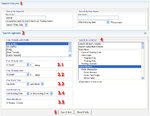
1. The top half is headed ‘Search Forums’ and requires you to enter either a keyword in the left hand box or the username of a member in the right hand box. Beneath Keyword(s), there is a box with a drop down arrow offering two options: ‘Search Entire Posts’ and ‘Search Titles Only’ The former will list any post with your keyword in it, while the latter will only list thread titles. Under the User Name box there is also a drop down arrow offering two options: ‘Find posts by user’ and ‘Find threads started by user’.
2. The bottom half of the window is entitled ‘Search Options’ and this is where you can really narrow your search. Under the section ‘Find Threads with Prefix’, the default option of (any prefix) will be selected – highlighted in blue in the graphic. But you can change this easily to select threads with a specific prefix.
3.1 – 3.5 Beneath that, there are a further five options, enabling you to refine your search of threads according to the number of replies, date and the way the results are sorted. Lastly, you can elect to show the results as threads or posts.
4. For the sake of argument, let’s say we’re interested to find out about spreads in the Forex market. The word ‘spread’ is entered in the Keyword(s) box in the ‘Search Forums’ panel at the top. Below it, in the ‘Search Options’ panel, the default settings 3.1 – 3.5 are left as they are. On the right hand side of the ‘Search Options’ panel is a window entitled ‘Search in Forum(s)’. The default option is set to ‘Search All Open Forums’. However, in this example, because we are primarily interested in how spreads relate to Forex, we will confine our search to this forum category, (highlighted in blue in the graphic). If we were interested in opening an account and wanted to find who had the tightest spreads, we could refine the search further by clicking on ‘Forex Brokers’. The search engine would then confine its search to this one forum.
5. Lastly, once all the criteria for the search are selected, click ‘Search Now’. Please use the search facility to find threads on your chosen subject before starting a new thread! This saves on a lot of unnecessary duplication.
If there are any aspects about the search facility you require help with – or any other area of the site, please PM timsk or post your query in the T2W Feedback forum.
OTHER FORUM TOOLS TO FIND INTERESTING CONTENT
In addition to the search facility, you can sort threads according to their ratings, replies and views. For example, suppose we wanted to filter the threads in General Trading Chat. If you click on the main forum title as it appears listed in the 'Start Here' category, the page will open with this Sticky at the top, along with the 'Best Threads' Sticky. All the threads beneath these are listed in 'Last Post' order which is the default setting. To change this, simply click on 'Rating' 'Replies' or 'Views' to sort the threads accordingly. The small green downward arrow indicates how threads are sorted currently.
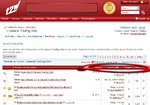
It is worth pointing out that the five star rating system isn't quite as it appears in that one vote of 5 stars is enough to secure this rating. In fact, the more ratings a thread has, the less likely it is to receive five stars - regardless of how good it is. Perhaps a better way to guage the interest generated by the thread is to see how many members voted for it. You can do this by hovering your cursor over the stars themselves. As a rough rule of thumb, any rating with more than half a dozen votes is high.
Other Resources on T2W & Beyond
The main resource for traders is the Articles section of T2W, which can be accessed via the ‘Articles’ tab mid way along the red menu bar at the top of the page. The contributions listed here are an eclectic mix that you would not expect to find in the Essentials Stickles in other forums.
What Style of Trader Am I?
In this article, veteran futures trader Don Dawson examines the basics styles of trading and assesses the relative pro’s and con’s of each.
Avoiding Potential Day-Trading Hazards
Trader333 is T2W's Content Editor and an experienced trader. In this article he outlines some of the practical issues traders would be wise to consider before entering the markets with real money.
Simplify Your Trading
In this article, Bill Provenzano, another veteran trader of CBoT and CME, provides his views about what lies at the core of successful trading.
Checklist for Successful Trading
Another article from Don Dawson in which he provides a simple ten point checklist to help ensure that when you’re trading the odds are stacked in your favour rather than against you.
The Cycle of ‘IT’
In this article, regular contributor Sam Seiden will help you to form a macro view of your trading and formulate the real reasons for wanting to be a trader. If your only reason to trade is to make money, you may re-think your motives after reading this article.
In addition to the Articles section, the Reviews section provides a comprehensive list of products and services for traders with their accompanying reviews by T2W members. This can be accessed via the ‘Reviews’ tab (next to the ‘Articles’ tab) mid way along the red menu bar at the top of the page.
If you know of any resources either here on T2W or beyond that would be of interest and value to members who want to learn more about trading journals, please contact timsk, T2W Content Manager and, if at all possible, they will be added.
Welcome to the Essentials Of 'General Trading Chat' Sticky. ‘Essentials’ Stickies are threads that are ‘stuck’ to the top of a forum index. They contain information about the forum you’re in that is of critical or ongoing value - hence the ‘Essentials’ name. If there’s anything missing from this Sticky that you hoped or expected to find, please contact timsk, T2W Content Manager and, if at all possible, it will be added.
What is the ‘General Trading Chat’ Forum?
The forum is for trading related content that does not clearly belong in any other forum. This section of the Sticky explores the types of threads that fall into this category and how to use the forum tools to find existing threads that relate to your topic of interest. If there’s an appropriate existing thread, please post to that thread rather than start a new one of your own.
Other Resources on T2W & Beyond
There are some excellent general resources for traders beyond the walls of this forum. Here, you will find links with a short précis about contributions to the Articles section.
What is the ‘General Trading Chat’ Forum?
There are more disadvantages than there are advantages to posting in the ‘General Trading Chat’ forum. It’s a popular forum and one that receives a lot of traffic, but the down side to this is that most threads have a short life expectancy and are quickly buried under new threads. Certainly, General Trading Chat is not the best forum to have an ongoing and rigorous debate about serious issues. With this in mind, before starting a new thread here, please check the other forums to see if there is a more suitable home for your contribution. Additionally, to avoid repetition of very similar threads, please make full use of the search facility to see if there is a thread already in existence that would be suitable for your intended post. How to use this to good effect is discussed in detail later on in this section of the Sticky.
T2W FORUMS AND SUB-FORUMS
There are ten open forum categories on T2W which, between them, contain no less than 42 main forums, 56 sub-forums and over 50,000 threads. The forum categories are as follows:
1. Start Here
2. Forex Markets
3. Financial Markets
4. Platforms
5. Styles & Strategies
6. Methodologies
7. Tools
8. Trading for a Living
9. The Lounge
10. T2W Community
There is one other category entitled ‘Members’ Forums’, which are private forums started and moderated by individual members. Please familiarise yourself with these main categories and the forums that are in them. Click on the ‘Forums’ tab next to ‘Home’ in the main red header panel for a complete listing. Almost certainly, there is either an existing thread on your topic of interest or, if not, a more appropriate forum than General Trading Chat to start a new one, where it’s far less likely to become a needle in a haystack. If there really isn’t a more appropriate forum to start your proposed ne thread, then this is the best place for it. However, it must be trading related; otherwise it belongs in ‘The Lounge’ category.
HOW TO USE THE SEARCH FACILITY
At the top of the page, beneath the main red header panel, you’ll see the directory which shows you where you are on the site (Forums > General Trading > General Trading Chat > Essentials Of ‘General Trading Chat’). To the right of this there are three boxes: ‘Quick Links’, ‘New Posts’ and ‘Search Forums’. The last one is a quick search facility which allows you to search for entire posts or thread titles only. You can enter the username of a member to find threads or posts by that person or enter a subject that interests you. The results will list all the threads or posts containing your search words.
If you want to refine your search, then it’s best to use the ‘Advanced Search’ facility. Click on ‘Quick Links’ and a drop down menu will appear with ‘Advanced Search’ in pole position. Click on this and a box will appear like the one shown in the graphic below.
1. The top half is headed ‘Search Forums’ and requires you to enter either a keyword in the left hand box or the username of a member in the right hand box. Beneath Keyword(s), there is a box with a drop down arrow offering two options: ‘Search Entire Posts’ and ‘Search Titles Only’ The former will list any post with your keyword in it, while the latter will only list thread titles. Under the User Name box there is also a drop down arrow offering two options: ‘Find posts by user’ and ‘Find threads started by user’.
2. The bottom half of the window is entitled ‘Search Options’ and this is where you can really narrow your search. Under the section ‘Find Threads with Prefix’, the default option of (any prefix) will be selected – highlighted in blue in the graphic. But you can change this easily to select threads with a specific prefix.
3.1 – 3.5 Beneath that, there are a further five options, enabling you to refine your search of threads according to the number of replies, date and the way the results are sorted. Lastly, you can elect to show the results as threads or posts.
4. For the sake of argument, let’s say we’re interested to find out about spreads in the Forex market. The word ‘spread’ is entered in the Keyword(s) box in the ‘Search Forums’ panel at the top. Below it, in the ‘Search Options’ panel, the default settings 3.1 – 3.5 are left as they are. On the right hand side of the ‘Search Options’ panel is a window entitled ‘Search in Forum(s)’. The default option is set to ‘Search All Open Forums’. However, in this example, because we are primarily interested in how spreads relate to Forex, we will confine our search to this forum category, (highlighted in blue in the graphic). If we were interested in opening an account and wanted to find who had the tightest spreads, we could refine the search further by clicking on ‘Forex Brokers’. The search engine would then confine its search to this one forum.
5. Lastly, once all the criteria for the search are selected, click ‘Search Now’. Please use the search facility to find threads on your chosen subject before starting a new thread! This saves on a lot of unnecessary duplication.
If there are any aspects about the search facility you require help with – or any other area of the site, please PM timsk or post your query in the T2W Feedback forum.
OTHER FORUM TOOLS TO FIND INTERESTING CONTENT
In addition to the search facility, you can sort threads according to their ratings, replies and views. For example, suppose we wanted to filter the threads in General Trading Chat. If you click on the main forum title as it appears listed in the 'Start Here' category, the page will open with this Sticky at the top, along with the 'Best Threads' Sticky. All the threads beneath these are listed in 'Last Post' order which is the default setting. To change this, simply click on 'Rating' 'Replies' or 'Views' to sort the threads accordingly. The small green downward arrow indicates how threads are sorted currently.
It is worth pointing out that the five star rating system isn't quite as it appears in that one vote of 5 stars is enough to secure this rating. In fact, the more ratings a thread has, the less likely it is to receive five stars - regardless of how good it is. Perhaps a better way to guage the interest generated by the thread is to see how many members voted for it. You can do this by hovering your cursor over the stars themselves. As a rough rule of thumb, any rating with more than half a dozen votes is high.
Other Resources on T2W & Beyond
The main resource for traders is the Articles section of T2W, which can be accessed via the ‘Articles’ tab mid way along the red menu bar at the top of the page. The contributions listed here are an eclectic mix that you would not expect to find in the Essentials Stickles in other forums.
What Style of Trader Am I?
In this article, veteran futures trader Don Dawson examines the basics styles of trading and assesses the relative pro’s and con’s of each.
Avoiding Potential Day-Trading Hazards
Trader333 is T2W's Content Editor and an experienced trader. In this article he outlines some of the practical issues traders would be wise to consider before entering the markets with real money.
Simplify Your Trading
In this article, Bill Provenzano, another veteran trader of CBoT and CME, provides his views about what lies at the core of successful trading.
Checklist for Successful Trading
Another article from Don Dawson in which he provides a simple ten point checklist to help ensure that when you’re trading the odds are stacked in your favour rather than against you.
The Cycle of ‘IT’
In this article, regular contributor Sam Seiden will help you to form a macro view of your trading and formulate the real reasons for wanting to be a trader. If your only reason to trade is to make money, you may re-think your motives after reading this article.
In addition to the Articles section, the Reviews section provides a comprehensive list of products and services for traders with their accompanying reviews by T2W members. This can be accessed via the ‘Reviews’ tab (next to the ‘Articles’ tab) mid way along the red menu bar at the top of the page.
If you know of any resources either here on T2W or beyond that would be of interest and value to members who want to learn more about trading journals, please contact timsk, T2W Content Manager and, if at all possible, they will be added.
Attachments

Last edited by a moderator:


